
Selling a domain isn’t just about aesthetics or brand appeal; it’s about proving digital value. Ahrefs offers a suite of metrics that quantify a domain’s SEO strength, making it easier to justify premium pricing and attract serious buyers. From backlink authority to keyword visibility, these numbers tell a story of potential.

From Domain Rating (DR) to backlink velocity and keyword rankings, Ahrefs reveals the hidden equity behind a domain name. Buyers aren’t just looking for a catchy URL; they want proof of authority, traffic potential, and SEO momentum. By showcasing metrics like referring domain quality, organic keyword footprint, and historical link growth, you can position your domain as a high-value digital asset worth investing in.
Ahrefs is a powerful SEO platform used by agencies, marketers, and businesses to analyze websites, track keyword rankings, audit technical issues, and uncover backlink opportunities. It’s known for its massive web crawler, which is second only to Google’s, allowing it to deliver highly accurate data across millions of domains.
Whether you’re optimizing your own site or managing SEO for clients, Ahrefs helps you:
It’s not just a tool, it’s a strategic command center for organic growth.
Ahrefs isn’t just for analysis; it’s a tactical engine for growth. Whether you’re auditing your site, spying on competitors, or discovering untapped keyword opportunities, Ahrefs gives you the data edge. Below are proven ways to turn that data into organic traffic gains:
Start with Keywords Explorer. Filter for low KD and high search volume terms that match your niche. Look for keywords with clear intent, whether informational, transactional, or navigational. Use the “Parent Topic” feature to find broader themes you can build content around.
Use Content Explorer to find top-performing articles in your industry. Study their structure, headlines, and backlink sources. Identify gaps in your own content strategy and replicate what’s working while adding your unique value.
Run a Site Audit to uncover crawl errors, broken links, duplicate content, and slow-loading pages. Ahrefs prioritizes issues by severity, so you can tackle the most impactful problems first. Fixing these improves crawlability and user experience, which directly affects rankings.
Use Site Explorer to analyze your competitors’ backlink profiles. Identify referring domains, anchor text patterns, and link types. Reach out to similar sources for guest posts, resource mentions, or broken link replacements. Focus on relevance and authority just quantity.
Set up Rank Tracker to monitor keyword positions across multiple locations and devices. Track changes weekly or monthly, and compare against competitors. Use this data to refine your strategy, doubling down on what’s working and adjusting where needed. You can also monitor SERP features like featured snippets, which offer quick-win visibility.

Increasing search volume for clients means expanding their keyword footprint while staying aligned with user intent. It’s not just about ranking for more terms; it’s about ranking for the right terms that drive qualified traffic. By identifying gaps, leveraging semantic variations, and aligning content with evolving search behavior, you can build a scalable strategy that delivers long-term growth. Here’s how to do it strategically:
Use Ahrefs to find long-tail variations, question-based queries, and semantic keywords. These often have lower competition and higher conversion potential. Group them by intent and topic to create a roadmap for future content.
Organize keywords into thematic clusters. Build pillar pages that target broad topics, supported by sub-pages that dive into specific angles. This improves internal linking, boosts topical authority, and helps Google understand your site structure.
For location-based clients, use Ahrefs to identify geo-specific keywords. Optimize landing pages with local modifiers, and build citations across relevant directories. Monitor local keyword rankings separately to ensure visibility in target regions.
Compare your client’s DR, UR, keyword count, and backlink profile against top competitors. Identify areas where your client is underperforming as missing keywords or weak link sources, and build a strategy to close those gaps. Use Ahrefs’ “Content Gap” tool to find keywords that competitors rank for that your client doesn’t.
Create clear, visual reports using Ahrefs data. Show keyword growth, traffic trends, backlink acquisition, and ranking improvements. Use these reports to demonstrate progress, justify strategy shifts, and build long-term trust with clients. Include actionable insights, not just raw data, to help clients understand the “why” behind the numbers.

Ahrefs metrics are more than numbersthey’re signals tha t reveal how search engines perceive your site, how competitive your keywords are, and where your growth opportunities lie. Here’s a breakdown of each metric, explained with clarity and strategic depth.
URL Rating measures the strength of a specific page’s backlink profile. It’s calculated based on the quantity and quality of links pointing to that page, including internal and external backlinks. A high UR means the page is likely to rank well, especially if the links come from authoritative sources.

How to use it:
Domain Rating reflects the overall authority of a website based on its backlink profile. It’s scored from 0 to 100, with higher scores indicating stronger domains. DR considers the number of unique referring domains and the strength of those domains.
How to use it:
Ahrefs Rank is a global ranking of websites based on the strength of their backlink profiles. The lower the rank number, the stronger the domain. It’s a relative metric that helps you understand your site’s position in the broader SEO.
How to use it:
This metric shows how many keywords your site ranks for in Google’s top 100 results. It reflects your keyword footprint and topical relevance. A growing number of organic keywords indicates expanding visibility across search queries.
How to use it:
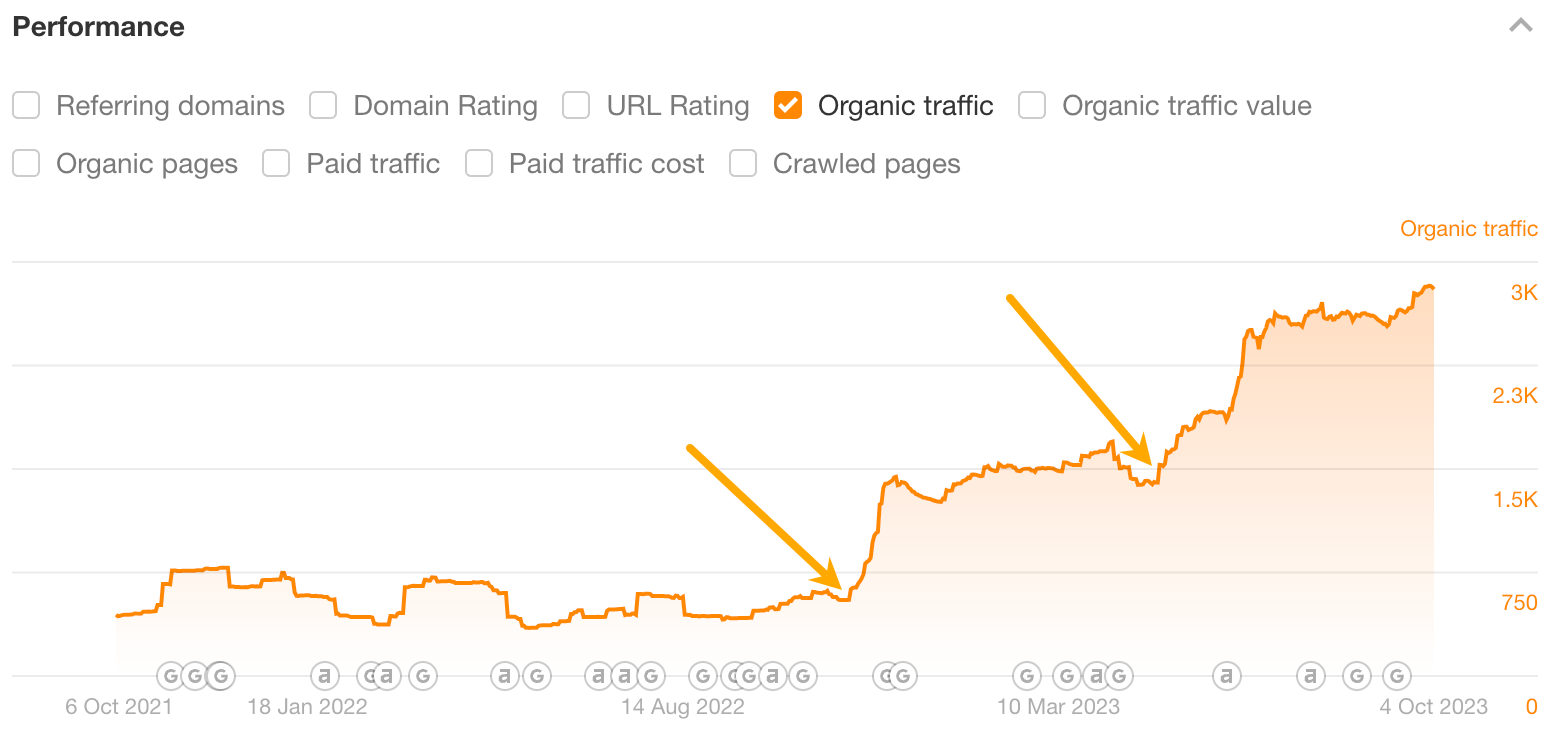
Organic Traffic estimates how many monthly visits your site receives from search engines. It’s based on keyword rankings, search volume, and click-through rates. This metric gives you a direct view of how well your content is performing in organic search.
How to use it:
This metric estimates how much your organic traffic would cost if acquired through paid ads. It’s calculated using keyword CPC values and traffic volume. The higher the value, the more your organic strategy is saving you in ad spend.
How to use it:
Paid Traffic Cost estimates how much competitors are spending on paid search for specific keywords. It helps you understand which terms are commercially valuable and where paid competition is high.
How to use it:
Keyword Difficulty predicts how hard it is to rank in the top 10 for a keyword. It’s based on the backlink profiles of current top-ranking pages. KD helps you assess whether a keyword is realistically achievable given your site’s authority.

How to use it:
Prioritize keywords where your site can compete naturally, so you can build momentum efficiently without needing extensive backlink campaigns.
Traffic Potential estimates the total traffic you could earn if you ranked #1 for a keyword and its related terms. It goes beyond search volume to show the full opportunity behind a topic.
How to use it:
Search Volume shows how often a keyword is searched monthly. It’s a core metric for understanding demand and planning content around user interest.
How to use it:
Parent Topic identifies the broader topic that encompasses your target keyword. It’s based on the top-ranking page and helps you understand the primary intent behind a search.
How to use it:
Share of Voice shows the percentage of total search traffic your site captures for a set of keywords compared to competitors. It’s a visibility metric that reflects dominance in a niche.
How to use it:
Organic Pages refers to the number of pages on your site that receive traffic from organic search. It’s a sign of how well your content is indexed and performing.
How to use it:
Crawled Pages is the total number of pages Ahrefs has discovered and analyzed on your site. This includes indexed and non-indexed pages, giving you a full view of your site’s footprint.

How to use it:
This tracks the number of unique domains linking to your site. Unlike total backlinks, which count every individual link, referring domains focus on diversity. A single domain linking 100 times counts as one referring domain.
How to use it:
This is the total number of inbound links pointing to your site or page. It includes both dofollow and nofollow links, and is a foundational metric for understanding link equity.
How to use it:
This shows the text used in backlinks pointing to your site. It helps you understand how search engines interpret your link profile and whether it’s over-optimized.
How to use it:
Ahrefs identifies which pages on your site attract the most backlinks or traffic. This helps you understand which content is performing best.

How to use it:
Ahrefs’ Content Gap tool lets you compare your site against competitors to find keywords they rank but you don’t. It’s one of the most actionable features for uncovering missed opportunities. It helps you build content that fills strategic holes, especially in competitive niches.
How to use it:
Ahrefs tracks whether your keywords trigger SERP features like featured snippets, People Also Ask, site links, and video carousels. Ranking in SERP features can dramatically increase visibility if you’re not in position #1.
How to use it:
Ahrefs shows internal linking structure, which is often ignored but essential for SEO. Strong internal links help distribute authority and improve crawlability. It boosts page-level rankings and improves user navigation.

How to use it:
Ahrefs can identify backlinks pointing to broken pages on your site. These are lost opportunities that can be reclaimed. Fixing broken backlinks restores lost authority and improves user experience.
How to use it:
Ahrefs stores historical data for keywords, backlinks, and traffic. This is gold for long-term strategy and client reporting. It helps you show progress, diagnose drops, and forecast future growth.
How to use it:
Ahrefs breaks down performance by subfolders (e.g., /blog/, /services/) and subdomains (e.g., shop.example.com). It helps you isolate which sections of a site are driving traffic or underperforming.
How to use it:
This tool shows which domains link to your competitors but not to you. It’s not a metric per se, but it’s a strategic feature that reveals missed backlink opportunities.
How to use it:
Ahrefs is divided into several core tools, each offering a different lens on your SEO performance:

Each tool has filters, export options, and visual graphs. You can slice the data by country, keyword type, referring domain, or page-level metrics. For agencies, this modular layout makes it easy to isolate insights for different clients or campaigns.
Domain Rating is a key authority metric, but tracking it effectively requires context and consistency.
Here’s how to do it right:
Tracking DR isn’t just about watching a number about understanding the link-building ecosystem and how it drives visibility.
Ahrefs’ Domain Rating (DR) is a proprietary metric that scores the strength of a website’s backlink profile on a logarithmic scale from 0 to 100. The higher the DR, the more authoritative the domain is considered, though moving from DR 70 to 80 requires exponentially more effort than moving from 20 to 30.

Knowing the metrics is one thing; presenting them persuasively is another. Don’t just send a link to an Ahrefs report. Instead, build a compelling sales narrative around the data.
Lead with your strongest numbers. Create a simple, skimmable summary at the top of your sales listing.
Example:
Showcase the quality of the backlink profile. Take screenshots of the Referring Domains graph to show steady growth. If the domain has links from well-known, authoritative sites in its niche (e.g., industry publications, major blogs), mention them by name.
Go beyond the total number of keywords. Identify 5-10 high-intent keywords where the domain ranks on page 2. Frame these as “quick wins” for the buyer, explaining that a simple content refresh could push them to page 1 for a significant traffic boost.
The Organic Traffic Value metric is your most powerful tool. It directly translates SEO efforts into a dollar figure a buyer can understand. Frame it as a cost-saving: “This domain’s existing SEO authority provides the equivalent of $12,000 in monthly ad spend, giving you a massive head start.”
A serious buyer will perform their own due diligence. Be prepared to address potential red flags they might find in your Ahrefs profile:
In the modern domain aftermarket, a great name is only the beginning. The most valuable domains are those with a proven history of SEO performance and a clear path to future profitability. Ahrefs provides the objective, third-party data needed to elevate your domain from a speculative purchase to a strategic investment.
By mastering these key metrics and presenting them in a compelling narrative, you can effectively demonstrate your domain’s hidden equity. You’re not just selling a URL; you’re selling authority, visibility, and untapped potential. Let the data do the talking, and you’ll attract serious buyers willing to pay a premium for a digital asset that’s ready to perform from day one.