

Did you know that backlinks are one of the strongest ranking signals on Google? In fact, large-scale studies show that the top-ranking page on Google usually has around 3.8× more referring domains (backlinks) compared to lower-ranking pages. This doesn’t mean links alone guarantee #1 rankings, but it shows a clear correlation.
But here’s the thing: just having backlinks isn’t enough. If Google can’t crawl and process the page that links to you, the backlink is unlikely to count. Imagine building dozens of bridges to your website, but none of them connect—you won’t get any visitors. That’s exactly what happens with backlinks that Google never processes: they bring little to no SEO value.

So, if you want to rank higher in 2025, you must learn how to get your backlinks discovered and indexed faster. The good news? You’re about to learn exactly how to do it.
Backlink indexing is the process by which Google discovers your backlinks and adds them to its massive database (called an index). Think of Google’s index like a giant library catalog—if your backlink isn’t in the catalog, Google can’t use it to help your website rank higher.
Here’s how it works in simple terms:

The challenge is that Google doesn’t instantly know about every backlink. Sometimes it takes days, weeks, or even months for new backlinks to be discovered and processed.
Unindexed backlinks are like having money in a bank account that you can’t access. They provide zero SEO value until Google indexes them.
Research shows that websites with more indexed backlinks rank significantly higher in search results. In fact, the top result on Google typically has 3.8 times more indexed backlinks than results in positions 2-10.
When your backlinks get indexed faster, you get:
According to BlueTree Digital’s report, if you build 100 backlinks, only 45 may get indexed, leaving a 55% loss rate—meaning more than half of your link-building efforts could be wasted unless you take proactive steps.
Not all backlinks are created equal. Some get indexed in hours, others take months, and some never make it at all. Here’s why:

The fastest way to get your backlinks indexed is by earning them from websites that Google already trusts and crawls frequently—those with regular organic traffic, consistently fresh content, strong domain authority (40+ is solid, 70+ is excellent), relevance to your niche, and a clean technical setup like fast loading and mobile optimization.

To secure these high-quality links, use tools like Ahrefs or SEMrush to research authority sites in your industry, create valuable content worth linking to, and reach out with personalized pitches to relevant publishers who update their content regularly.
One backlink from a high-authority, frequently-crawled site is worth more than 10 backlinks from low-quality sites that rarely get crawled.
This is one of the most direct ways to speed up backlink indexing. You’re essentially telling Google exactly where to look for your new backlinks. It’s like sending Google a personal invitation to visit a specific page.
The beauty of this method lies in its directness. Instead of waiting for Google’s crawlers to randomly discover your backlink, you’re giving them the exact address and asking them to check it out immediately.
Here’s the catch, though – you can only submit URLs for websites you own or manage. This means you’ll need to maintain good relationships with webmasters who link to you, or work with an agency that has established connections in your industry.

Step-by-step process:

The results speak for themselves. This method often gets backlinks indexed within 1-3 days, making it one of the fastest approaches available. Many SEO professionals consider this their secret weapon for quick indexing. Remember to be selective with this method. Google limits the number of URLs you can submit daily, so save it for your most valuable backlinks that need immediate attention.
Note: Google Search Console is a powerful tool for indexing backlinks—but only for pages hosted on websites you own or manage. For third-party backlinks, you’ll need to rely on external strategies like social signals or tiered linking.
Social media platforms, especially Twitter, can significantly accelerate backlink indexing due to Google’s real-time indexing of social content. This strategy is effective because social media provides immediate visibility and signals content freshness to search engines.
When you share a page containing your backlink on social media, you’re essentially creating multiple pathways for Google to discover that content. The more engagement your social post receives, the stronger the signal becomes.
Why this works:
Twitter deserves special attention here. Since Google’s partnership with Twitter in 2015, the search engine has been indexing tweets in real-time. This means a tweet containing a link to your backlink page can be discovered and indexed within hours.

Don’t limit yourself to just Twitter, though. LinkedIn works exceptionally well for B2B content, while Pinterest can be powerful for visual or informational content. Facebook still reaches massive audiences, and the combination of all these platforms creates a comprehensive discovery network.
Note: Google has said social signals (likes, shares, etc.) are not direct ranking factors. Treat this strategy as a way to help Google find pages faster, not as a ranking boost.
RSS feeds provide search engines with a structured way to discover new content and backlinks quickly. Think of RSS feeds as direct communication channels between websites and search engines – they announce new content in a format that’s easy for crawlers to understand and process.
The power of RSS feeds lies in their automation and wide distribution. When content gets added to an RSS feed, it immediately gets syndicated across multiple platforms and aggregators that Google monitors closely.
How RSS feeds help indexing:
Setting up RSS feeds might seem technical, but it’s actually quite straightforward. Most modern websites already have RSS feeds built-in – you just need to make sure they’re properly configured and submitted to the right directories.
The key is choosing RSS directories that have good relationships with Google. Some directories are crawled daily, while others might only be checked weekly or monthly.
Best RSS directories for 2025:
Start by creating or optimizing the RSS feed for websites linking to you. Then systematically submit these feeds to major directories, focusing on those most relevant to your industry.
Google’s Indexing API is a powerful tool, but it comes with important limitations you need to understand before diving in. This API allows you to directly notify Google when pages are added or removed, essentially fast-tracking the indexing process.

The official stance is that this API should only be used for JobPosting and BroadcastEvent markup. However, many SEO professionals report success using it for other types of content, though this comes with some risk since it’s outside Google’s official guidelines.
Current API limitations:
Setting up the API requires some technical knowledge, but modern SEO plugins like RankMath and Yoast have simplified the process significantly. You’ll need to create a Google Cloud Console project, enable the API, and generate the necessary credentials.
The setup process involves creating a Google Cloud Console project, enabling the Indexing API, generating JSON credentials, and then installing the integration through your preferred SEO plugin. Most people find the plugin route much easier than manual implementation.
While Google officially limits this API, many SEO professionals successfully use it for general indexing. Test carefully and monitor results to see what works for your specific situation.
This strategy involves creating links from your own website to the pages that link back to you, creating a “discovery pathway” for Google. It’s a clever way to use your own site’s crawling frequency to help Google find your backlinks faster.

Since Google already crawls your website regularly, you can leverage this existing relationship to guide search engines toward pages containing your backlinks. When Google follows your internal links to external sites, it discovers your backlinks in the process.
Why this works:
The key is making these internal links feel natural and valuable to your readers. You don’t want to create obvious “link schemes” that provide no user value. Instead, focus on creating genuine resources that naturally reference the content linking to you.
Consider writing blog posts that reference industry articles mentioning your brand, or create resource pages linking to high-quality content in your space. The goal is to create legitimate reasons for linking to pages that contain your backlinks.
Example: If you got a backlink from an industry blog post about “SEO trends,” you could write your own comprehensive post about SEO trends and naturally reference that external article as one of your sources.
This advanced strategy involves building backlinks to the pages that already link to you, creating additional pathways for Google to discover your original backlinks. It’s like creating multiple roads leading to the same destination – the more routes available, the faster Google will find its way there.
Here’s how it works in practice: Page A links to your website (that’s your Tier-1 backlink). Then you build links to Page A from other sites (those become Tier-2 backlinks). When Google finds Page A faster through the Tier-2 links, your original backlink gets indexed sooner.
The concept:
This strategy requires careful execution to avoid creating suspicious patterns. The goal is to naturally increase the authority and discoverability of pages linking to you, not to create artificial link schemes.
Focus on building just 2-3 high-quality Tier-2 links rather than dozens of low-quality ones. You can achieve this through social bookmarking, sharing on industry forums, or getting the content featured in newsletters relevant to your space.
Remember: don’t go overboard with this strategy. Google’s algorithms are sophisticated enough to detect artificial link patterns, so subtlety is key.
Before you can speed up indexing, you need to know which backlinks aren’t indexed yet. Here are the most reliable methods:
The simplest way to check individual backlinks:
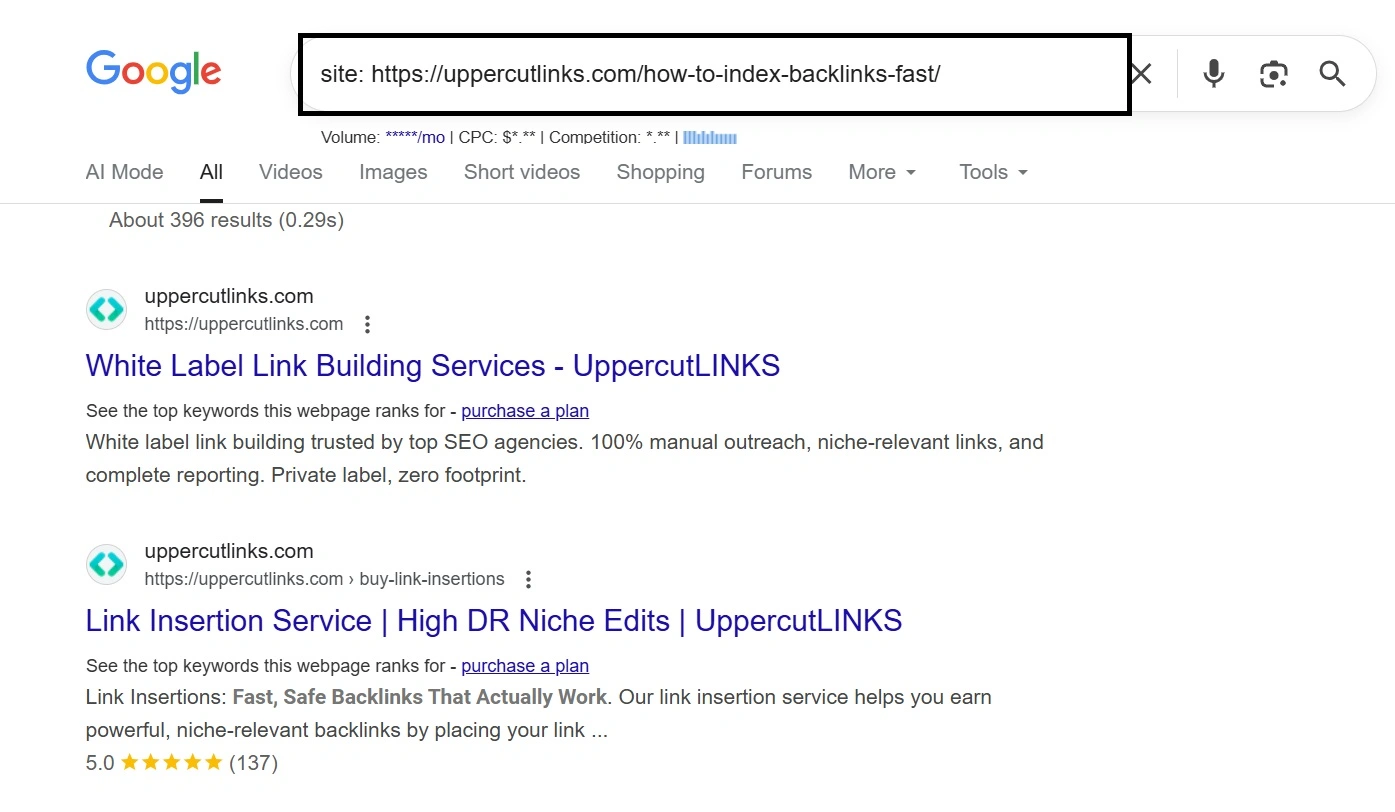
For backlinks to your own site:

Professional SEO tools provide bulk checking:
Best tools for checking backlink indexing:
Specialized tools for mass checking:
To effectively track backlink indexing success, monitor key performance indicators such as indexing speed (average time from creation to indexing), indexing rate (percentage of links indexed), traffic impact from indexed backlinks, ranking improvements, and overall domain authority growth.
Use a monthly reporting spreadsheet to log the date each backlink was built, its source URL, when indexing was confirmed, time to indexing, traffic or ranking changes, and any follow-up actions.
Stay alert for red flags like backlinks not indexing after 90 days, sudden drops in indexed links, de-indexing after initial success, or lack of traffic from high-value backlinks.
In 2025, Google’s algorithms are smarter than ever at evaluating content quality and link relevance. The focus is shifting from “forcing backlinks to index” toward ensuring backlinks come from relevant, high-quality, and indexable pages.
Instead of chasing shortcuts, your best bet is to:
That way, your backlinks will not only be indexed but also deliver lasting SEO value.
How long does it usually take for a backlink to get indexed?
It varies a lot! Some backlinks can be indexed within a few hours, while others might take days, weeks, or even longer. It depends on the quality of the host page, how often Google crawls that website, and how many other signals are pointing to it.
Can I force Google to index my backlinks?
You can’t “force” Google, but you can definitely give it a strong nudge! Using Google Search Console’s “Inspect URL” and “Request Indexing” features is the closest you get to directly asking Google to look at a page. Sharing the link on social media also helps.
What if my backlink never gets indexed?
If a backlink isn’t indexed after a long time, it might not be providing any value. You should check the quality of the page where the backlink is located. Is it low-quality, spammy, or does it have technical issues? Sometimes, it’s just a lost cause, and it’s better to focus on building new, high-quality links.
Are all types of backlinks equally likely to get indexed?
No! Backlinks from high-authority, frequently updated websites are much more likely to be indexed quickly than those from new, low-quality, or rarely crawled websites. Google pays more attention to websites it trusts.
Does it matter where on a page my backlink is placed?
Yes, it can! Backlinks placed naturally within the main content of an article (editorial links) are generally seen as more valuable and are more likely to be noticed by Google than links in the footer, sidebar, or a very long list of links. Google prefers links that are genuinely helpful to the reader.